Governance
Row filters and column masks enforced on every query, the catalog and lineage, personal data, audit export, SCIM provisioning, version history and Git sync.
Access policies#
Access policies (a table page's Lineage & access tab; all of them under Tables › "..." › Access policies) give a workspace's owners row- and column-level security per table:
- a row filter — a SQL predicate, with
{{user.email}},{{user.id}},{{user.role}}and{{user.groups}}substituted as literals (region = 'EU',owner = {{user.email}}); - column masks —
null,redact(••••),hash,partial(all but the last four characters) or an expression; - whom it applies to — roles, people, teams, or everyone. Owners are never restricted.
Enforcement sits where every query meets the engine. ZAANIX parses each statement with DuckDB's own parser and replaces every reference to a protected table — however it is named or aliased, in joins, subqueries and CTEs — with a filtered, masked subquery, then runs the result. So the policy holds for the SQL workbench, dashboards, Mosaic, notebooks, alerts, snapshots, BI tools over the Postgres protocol, the AI and agents alike. People under a policy run SELECT statements only, cannot read the files a table came from, and cannot use views that read a protected table. Preview shows the rewritten SQL and the rows a member would see.
A policy that applies to embeds filters what signed embeds show — tenant = {{embed.tenant}} gives each customer their own rows.
Catalog and lineage#
The catalog (a table page's Columns tab; Tables › "..." › Catalog: tags and fields): descriptions and tags (pii, finance) on tables, views and columns, written by editors and read by everyone — including ZAANIX AI and agents, which are told to trust them over guesses from names.
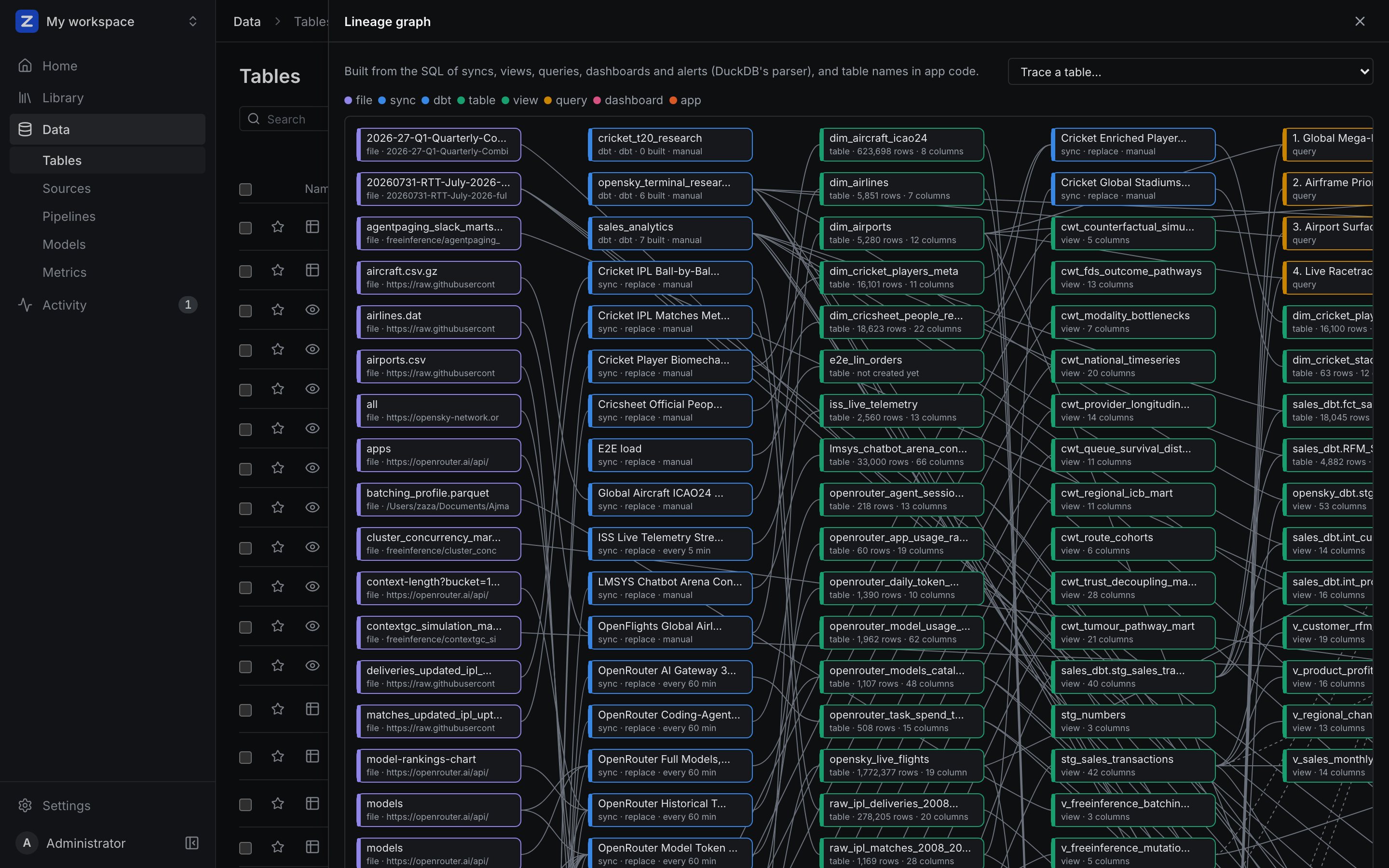
Lineage (a table page's Lineage & access tab; the whole graph under Tables › "..." › Lineage graph) is built from what ZAANIX knows, using DuckDB's parser on the SQL: syncs load tables; views, saved queries, dashboards, alerts and syncs read tables and files; dbt projects build models; data apps mention tables; snapshots render dashboards. Trace a table to see only what feeds it and what it feeds. With lineage.openlineage_url set, every sync run posts OpenLineage events for Marquez, DataHub or OpenMetadata.
Personal data#
Scan a workspace for columns that hold personal data — by their names (email, phone, date of birth…) and by their values: email addresses, phone numbers, card numbers that pass the Luhn check, IBANs, IP addresses, US social security and UK national insurance numbers. Only a sample is read, and examples come back masked. Tag the findings in the catalog (pii, pii:<kind>) and protect them with a masking policy — from the platform or by agents (scan_pii, tag_pii, protect_pii).
Audit and its export#
Every sign-in, query, tool call and change is in the audit log. Audit export (administrators) streams it to Splunk, Datadog, Elasticsearch / OpenSearch, a signed NDJSON webhook, or gzipped NDJSON files in a bucket — in order, at least once, each destination with its own cursor and back-off.
Identity: SSO and SCIM#
- Single sign-on with OIDC (Authorization Code + PKCE).
OIDC_GROUPS_CLAIMmaps identity-provider groups to teams; members ofauth.oidc.admin_groupsbecome administrators. - SCIM 2.0 at
/scim/v2for Okta, Entra ID, OneLogin and JumpCloud: the IdP creates, updates and deactivates people, and pushes groups as teams. An administrator can pre-link a team to an IdP group and share workspaces with it before anyone in it has signed in. - Deactivating someone blocks their sign-in, rejects their sessions and API tokens on the next request, and pauses the alerts, syncs and apps that run as them.
Version history#
Every save of notebooks, dashboards, saved queries, the semantic layer and dbt projects is kept (quick successive saves by one person count as one). History lists the versions, shows what restoring one would change as a diff, and restores it — keeping what was there. Name this version keeps a state under a name ("Signed off by finance").
Git sync#
Settings › Workspace › Git puts a workspace's definitions in a Git repository as readable files — notebooks and dashboards as YAML, queries as SQL, the semantic layer, dbt projects:
- Push commits the workspace's files as the person pushing; it is refused while the repository has commits this workspace has not pulled.
- Pull brings in what changed upstream, each change recorded in the object's version history. A conflict takes the repository's version and keeps the local one in history.
- Several workspaces (development and production) can share one repository. The access token is encrypted and never written to disk.