ZAANIX Agent
Handing data work to the agent built into ZAANIX — Home, missions, the canvas and briefs, scheduled missions, approvals and the autonomy dial, and the ways in from the command line, MCP clients, Slack and Teams.
ZAANIX Agent is part of ZAANIX: Home is the agent. Choose the data and say what you need; the agent works in your workspace as you — it reads with your access, and ZAANIX holds its changes until you approve them. Results come back as findings, charts, tables and SQL, and everything it makes opens in ZAANIX: a query tab, a dashboard widget, a brief. Since 3.0 there is no second app, port or sign-in.
People who prefer the platform keep using it; the agent is the second way to work, and it is also inside every page: Ask about this in any object's "..." menu opens a mission scoped to what is on screen, in a side panel.
Turn it on#
The agent needs a model, and nothing else. An administrator sets one under Settings › AI › Model (Anthropic, OpenAI, Gemini, DeepSeek, OpenRouter, Kimi, Groq, Mistral, Grok, Ollama, any OpenAI-compatible endpoint, Amazon Bedrock, Bedrock Agent or AgentCore) — or people keep their own key there, sealed on the server and used for them everywhere. Without a model, Home is search and four plain starts (new query, new notebook, upload data, connect a source), and every AI action is hidden.
| Setting | Default | What it is |
|---|---|---|
AI_PROVIDER, AI_MODEL, AI_API_KEY, AI_BASE_URL | none | A deployment-time model (a model saved in Settings wins). The 2.x names COPILOT_* still work |
ai.allow_byok | true | Whether people may keep their own key |
agent.max_steps, agent.max_retries, agent.max_output_tokens | 12, 2, 4096 | How far one request may go |
agent.budget, agent.pricing | none | A daily budget, and prices per million tokens for cost estimates |
agent.slack.*, agent.teams.* | off | The Slack (Socket Mode) and Microsoft Teams bots |
Who may use the agent, from where, the most it may do without asking, which tools are off, daily budgets and how long missions are kept are Settings › AI › Agent policy (administrators); Agent people shows usage and the audit.
The home#
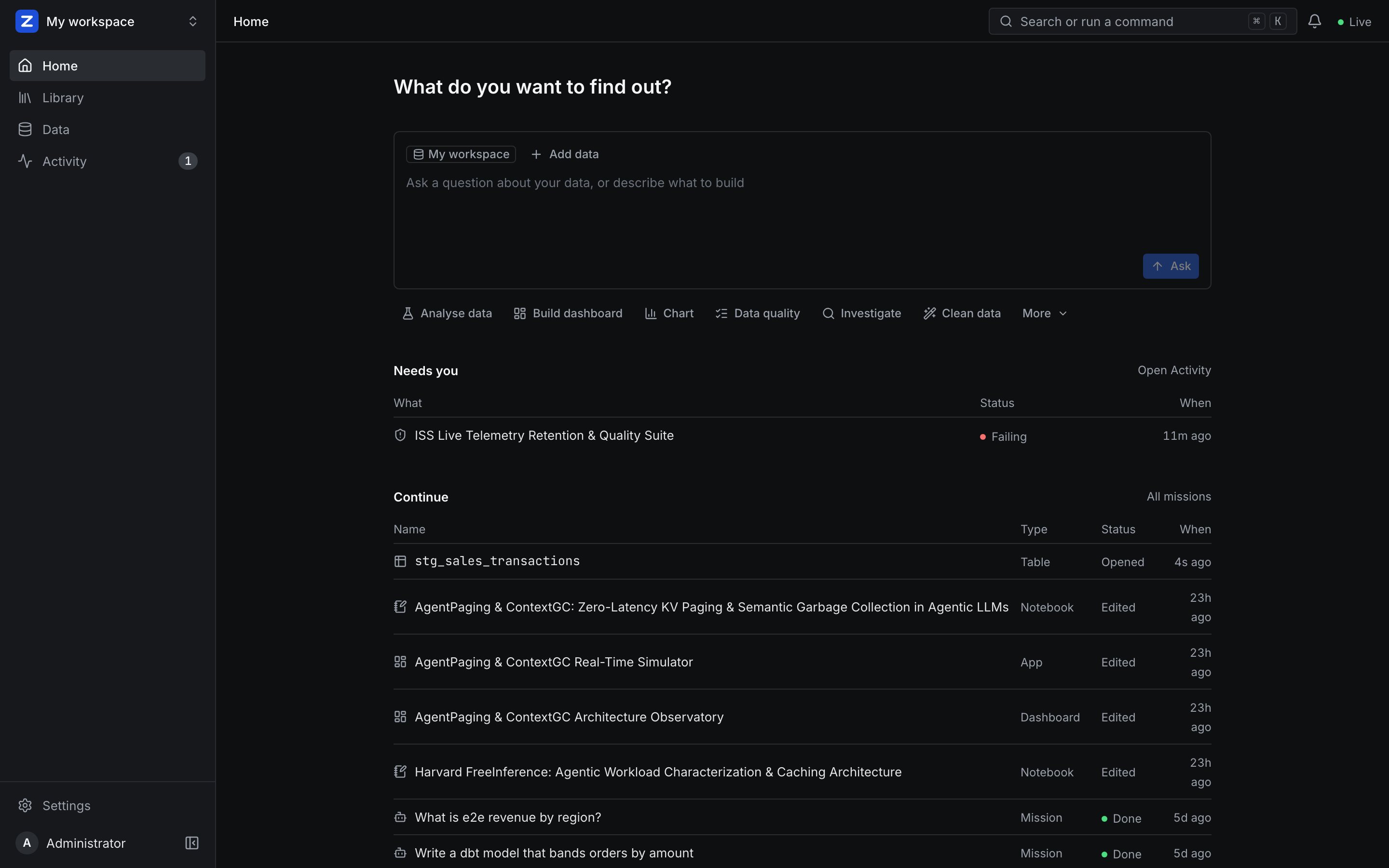
The home is one question and one prompt card.
- Capabilities. Under the prompt: Analyse data, Build dashboard, Chart, Data quality, Investigate, Clean data and, under More, Notebook, Data app and Metrics — only those your role in the workspace allows. Choosing one puts it in the prompt as a pill (with its option, when it has one: Grid or Interactive for a dashboard; Streamlit, Dash or Gradio for an app), changes the placeholder, shows four sample prompts written for the data in your context, and points the agent at that capability's tools first. Every other tool stays available.
- The composer.
@mentions tables, views, files, metrics and dashboards as you can see them (a mentioned table joins the request's data);/chart,/dashboard,/check,/explainand/whystart from a common request. ⌘↵ starts the mission.
The context panel#
The data the agent works with, kept apart from the prompt. Anything added here goes with the next request as its chosen data; the agent reads it first and may still find more. Add data (or the prompt's +) opens four sources:
| Source | What you can add |
|---|---|
| In the workspace | Tables, views and files, as ZAANIX's catalog shows them to you |
| Server files | Folders and data files on the ZAANIX server, as its file jail allows |
| Remote | Your connected sources — lakehouses (Databricks, Iceberg catalogs), database connections and cloud buckets, browsed down to a table or file — or any http(s), s3, gs or az URL |
| From my computer | Files uploaded into the workspace's uploads/ folder; you can also drop files on the panel |
Data from outside the catalog is opened with ZAANIX's inspect, as you, before it is added — a URL that cannot be read is refused in words — and reaches the model with its columns. A lakehouse table that runs on a remote warehouse (Databricks) is read with lakehouse_query on that warehouse, and the agent is told so. In a mission, the prompt's + adds data for the next message.
Missions#
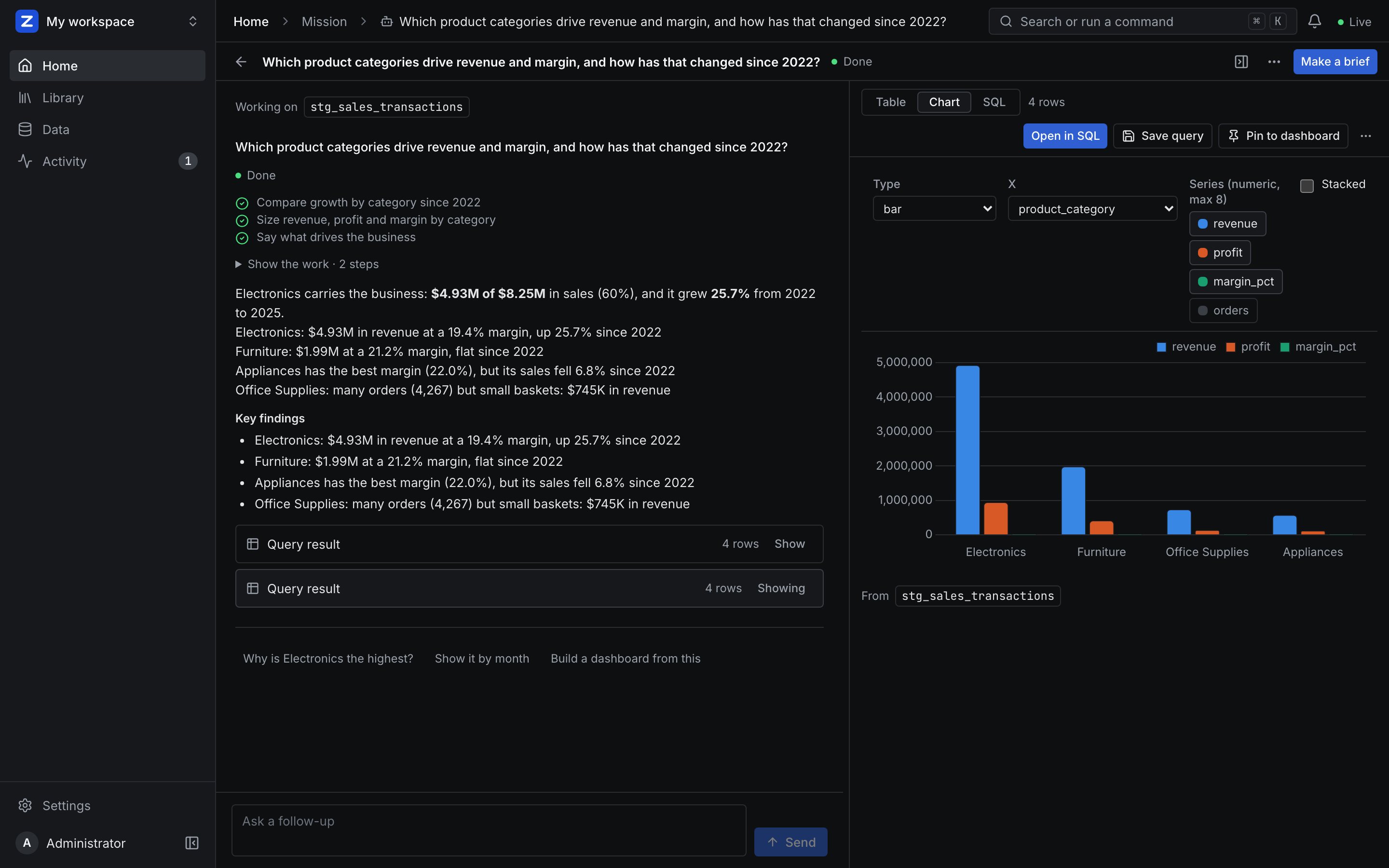
- Missions as threads. Each request is a message; the agent's turn shows its plan and steps (folded away), the answer, key findings and results. "Verified metric" appears when a defined metric answered; otherwise the tables the result read are listed. The data you chose and the data the agent found are shown apart. Follow-up suggestions come after each answer.
- The canvas. One result shown large beside the thread, as a chart (bar, line or area; pick the axes), a table or the SQL, with Where this comes from and its lineage links. Pin to dashboard, Save as query, download a CSV, or Open SQL in ZAANIX.
- Briefs. A mission becomes a report page — summary, KPI tiles, charts, tables and findings. Edit it, refresh its numbers (run again as you), save it as a ZAANIX dashboard to share it, copy it as Markdown, or print it.
- Where they live. Home's Continue lists recent missions and briefs; all of them are in the Library (Missions, Briefs); a mission waiting for you is in Activity › Needs you.
- Scheduled missions. Save a mission with a schedule (its "..." › Schedule), or start from a template under Library › New › Scheduled mission: anomaly investigator, weekly business review, data quality auditor, pipeline watcher, catalog writer, dbt reviewer, data analyst, and eight Research investigators. They run read-only by default, show every step, turn each run into a brief and post it to Slack, Teams, email or a webhook. Publish one and other agents can call it over A2A.
Approvals and the autonomy dial#
Reads always run. There are three kinds of action, each set to Ask me or Go ahead by each person in Settings › AI › Agent autonomy:
| Kind | Examples | Default |
|---|---|---|
| Create things | Dashboard widgets, quality checks, notebooks, saved queries | Go ahead |
| Change or delete data, or export it | SQL that changes tables, models, writing files | Ask me |
| Publish or reach outside ZAANIX | Publishing apps or endpoints, alerts, reverse syncs | Ask me |
- Ask me is kept by the agent itself: the call waits for you even where ZAANIX would let it through.
- Go ahead approves ZAANIX's own hold for you, and the steps say so.
- Dropping, deleting or truncating data always asks.
- After you approve several of one kind in a row, the settings page suggests letting the agent go ahead with them.
Activity › Needs you lists everything waiting for you across missions; the mission shows each approval in place — asked, given, declined or automatic — and the audit log records them.
Security#
- Identity is ZAANIX's. The agent runs inside the server as the signed-in person; nothing is minted or stored for it.
- Reading and tools run as you, as an agent acting for you: your workspace roles, row filters, column masks, the SQL guard and the file jail apply; changes are held until you approve them; calls are audited as the agent's.
- Offering tools is not permission. A viewer or read-only account is offered reading tools only, and ZAANIX still checks every call.
- Missions and briefs are private to the person who started them. Sharing happens in ZAANIX: a brief saved as a dashboard is shared there, under ZAANIX's access rules.
Everywhere you work#
- The command line.
zaanix-agent(served by your ZAANIX at/cli/install.sh) asks, continues and fetches missions; it signs in with a device code approved in the browser. Coding agents such as Claude Code and Codex can drive it. - MCP clients. ZAANIX's own
/mcpoffersask_data_agent,continue_mission,get_mission,get_resultandlist_missionsnext to the platform's tools, with OAuth sign-in for clients that support it. - Slack and Microsoft Teams. Ask in a channel or a direct message; link your chat account once, and the agent answers as you.
- Scripts.
/api/v1with an agent token (Settings › Profile › Agent access).
Models#
One model for everyone (Settings › AI › Model), or each person's own key. Besides its own tool protocol, the agent reads the native tool-call formats of open models (Qwen, GLM, Llama, LFM), hides their reasoning text, and asks again when a model replies with nothing. Pick a capable model for real work: free, rotating models vary a lot. Tokens and cost are recorded per task and shown under Settings › AI › Usage.
Coming from the separate ZAANIX Agent app (before 2.2)? zaanix import-agent-data --from agent.db brings its missions, briefs and memories over.